
Desktop app for Windows PC
Payroll Africa for Windows
Run payroll, payslips and employee records from your desktop — the same secure account you use in the browser.
v1.0.1 (81 MB) · Windows 64-bit
By downloading and using Payroll Africa, you accept our Terms of Service and our Privacy Policy.
Compatible Windows versions
Check your Windows version before you download.
Windows 11
Supported
64-bit
Windows 10
Supported
64-bit
Windows 8 / 8.1
Not supported
Use the web app
Windows 7
Not supported
Use the web app
Windows XP
Not supported
Use the web app
On an older computer? You can always use Payroll Africa in your web browser — sign in here.
Avast or your antivirus may scan the app first
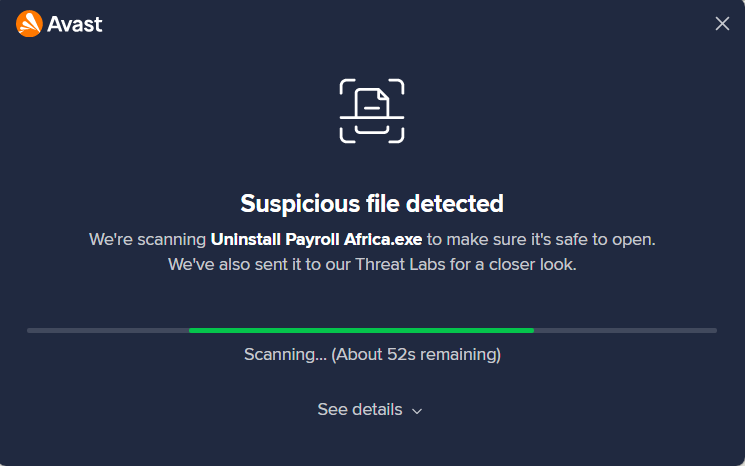
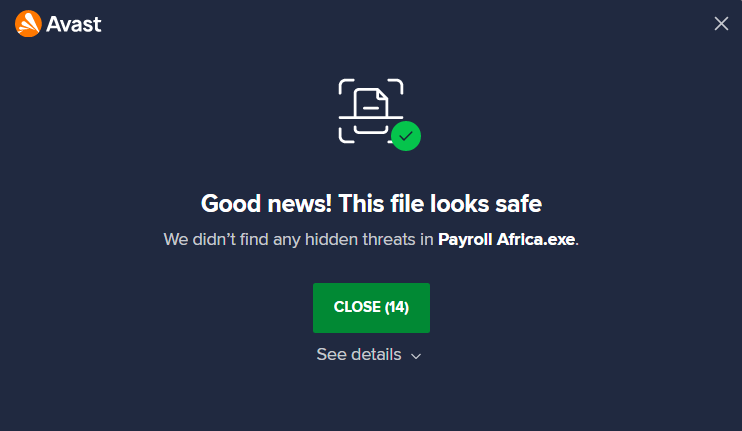
Because our desktop app is new, some antivirus programs such as Avast have not seen it many times yet. When you open the installer, Avast may show "Suspicious file detected" and scan it automatically. Do not cancel — just let the scan finish. It takes about a minute, and Avast will then confirm the file is safe so you can carry on installing.
As more people install the app, these checks become less frequent. Only download the app from this page.